
How to set river level alerts without alert fatigue
By Tobias Müller. Published .
A public works operator near Parksville, British Columbia, is on call for the week. The Englishman River can rise fast after autumn storms, and Martindale Road beside it is one of the first places to flood. In January 2021, search and rescue volunteers took 15 people from their homes there in small boats. The operator has an alert on the river gauge that sends a message when the level passes a limit. But the river hovers near that limit for hours, and the phone buzzes every few minutes. This can lead to alert fatigue. The Google SRE book describes it: when pages occur too frequently, employees “second-guess, skim, or even ignore incoming alerts”. A well-set alert rule stays quiet while the river hovers and sends a new message only when it really matters.
The chart shows the live level of the Englishman River for the last 7 days, with the rule from this guide: a Medium alert above 1.50 m, a Critical alert above 2.20 m, and a reset line at 1.30 m. State now is the result of that rule for these readings. When this guide was published on 10 November 2026, the river was above 1.50 m and the rule was in a Medium alert.
Fewer repeat messages
A single limit sends a message each time the reading crosses it. A river near 1.50 m can cross that line dozens of times in an afternoon. For comparison, summaries of the EEMUA 191 alarm guideline treat fewer than one new alarm per 10 minutes as very likely acceptable and call more than 10 new alarms in 10 minutes an alarm flood.
Two settings help. A reset margin ends the alert only when the level falls a set distance below the limit. With a limit of 1.50 m and a margin of 0.20 m, the alert ends below 1.30 m, and movements in between send nothing more. A margin a little larger than the normal movement of the level in a calm week works well.
A waiting time holds the message until the level has stayed above the limit for a while, so one odd reading does not start an alert. For a slow river, 30 minutes is a reasonable start. The wait adds delay, so a fast hazard needs a shorter one.
Two levels, two channels
The SRE book has a short test for a message: “Every page should be actionable.” Two levels with different delivery come close to that.
| Level | Example condition | Delivery |
|---|---|---|
| Medium | Level above 1.50 m | Email, read in the morning |
| Critical | Level above 2.20 m | Push notification to the on-call phone |
It also helps when one person answers for each incident. In Warnspot, an incident is the ongoing problem behind the repeated triggers of a rule, as How Warnspot works explains. That person acknowledges the incident, which stops the repeat messages. If nobody does within a set time, the incident goes to the next contact.
Missing data
A station that stops sending data looks the same as a calm river, because a limit rule has nothing to compare. A second rule that sends a message when no new reading arrives covers this. Environment Canada publishes river readings about every 5 minutes, but they often reach the public servers in batches up to an hour late. Three hours without a reading is a reasonable limit.
Set it up in Warnspot
Warnspot already collects the Environment Canada river stations. You do not need to download any files. The chart at the top of this guide uses these readings.
- Open Recipient lists and click Create recipient list. A recipient list holds the people and channels that receive a message. Make one list for email and set Minimum severity to Medium. Make a second list for ntfy push messages and set it to Critical. To keep nights quiet, turn on Send only during set hours and days for the email list only.
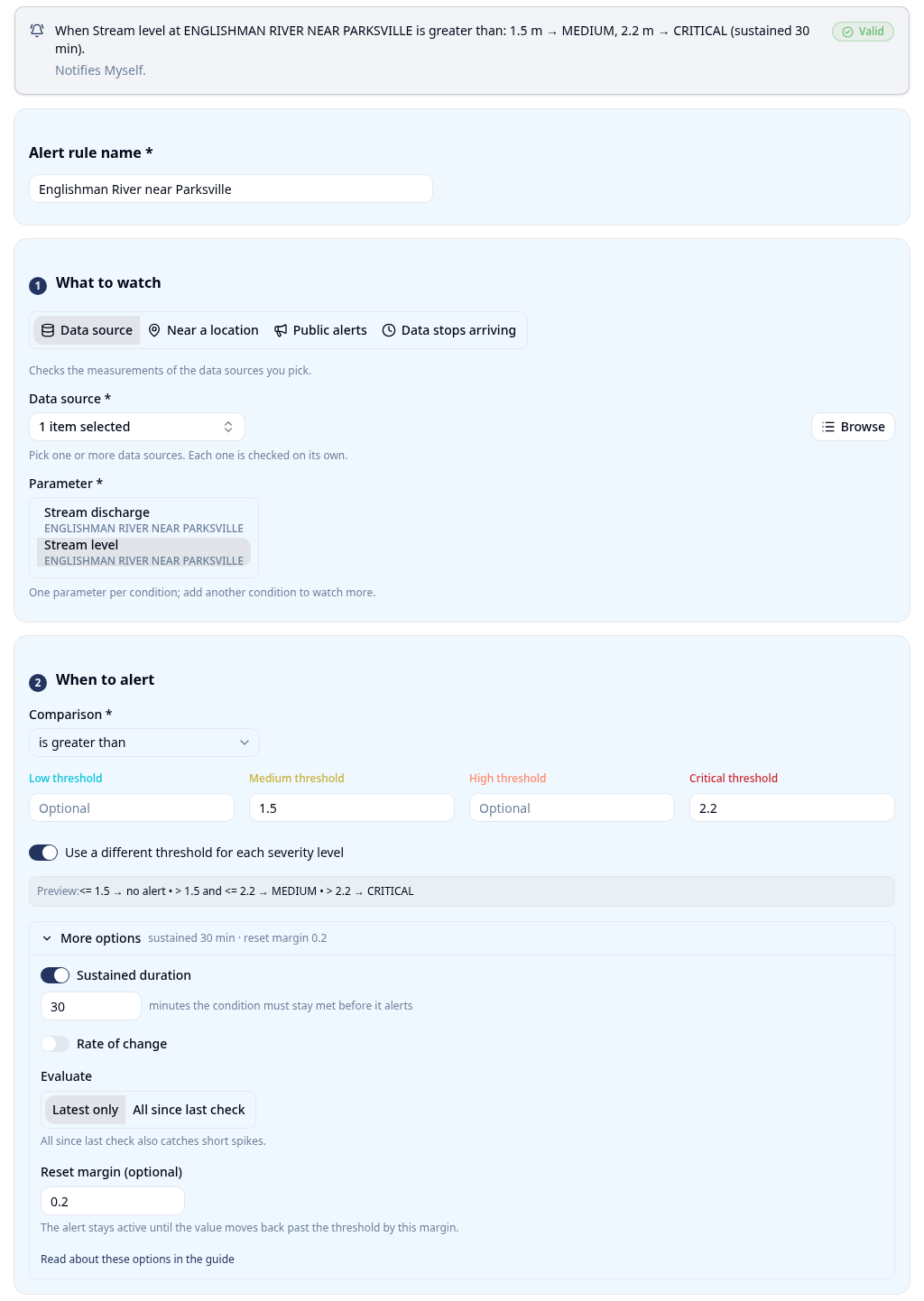
- Open Alert rules and click Create alert rule. An alert rule watches your data and sends a
message to the people you choose. Enter an Alert rule name. Under What to watch, choose Data source, select
ENGLISHMAN RIVER NEAR PARKSVILLE, and select the Stream level parameter. - Under When to alert, turn on Use a different threshold for each severity level. Enter 1.5 as the Medium threshold and 2.2 as the Critical threshold.
- Open More options. Turn on Sustained duration and enter 30 minutes. Enter 0.2 as the Reset margin. The alert then resets below 1.3 m.
- Under Who to notify, select both recipient lists.
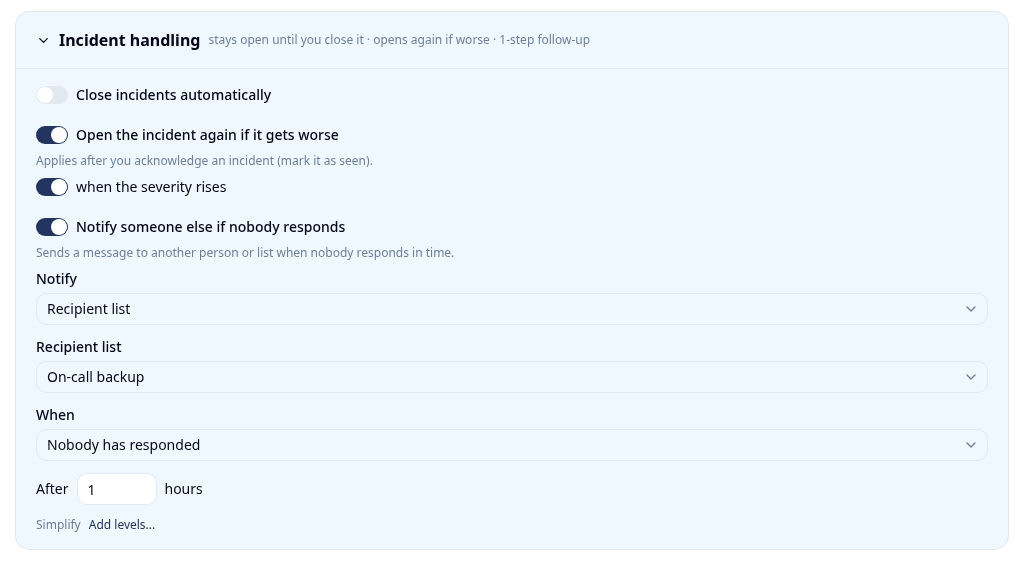
- Open Incident handling and turn on Notify someone else if nobody responds. Click Customize…, set Notify to the person or recipient list that backs up the operator, and set the hours. Click Create alert rule.
- Create a second alert rule for the same station. Choose Data stops arriving and enter 3 as No data for (hours).
- Open Locations and click Create Location. Enter a Location name and the Latitude and Longitude of a point on Martindale Road. The Location notices card on the location page lists the public alerts near that point. Public alerts are official notices, such as weather warnings, evacuation orders, and DriveBC road events.
- Create a third alert rule. Under What to watch, choose Public alerts, select the location, and enter a Radius (km). Under Categories, select Road events. The rule sends a message when DriveBC reports a road event inside the radius. A full closure has the severity High, so it reaches the email list.
Note: DriveBC reports events on provincial highways and major routes. A closure of a small local road may not appear there.
The limits here are examples. The past levels of the station are on the Water Office.
The operator now gets an email for a rising river and a push notification when the road needs closing. A silent gauge or a road event that DriveBC reports nearby also sends a message.
Sources
- Google SRE book, Monitoring Distributed Systems
- Control Global, ASM Alarm Management Guidelines and ISA-18.2
- Chemical Engineering, Alarm Management by the Numbers
- MSC open data, real-time hydrometric data readme
- Water Office, Water Survey of Canada
- CHEK News, Heavy rain leads to flooding in several Vancouver Island communities
Build your first quiet rule
Create an account to watch the Englishman River, or any river station in Canada, free for 14 days. The trial needs no credit card. To connect your own sensors as well, contact us.